
A separate reporting database
Data is copied on a schedule you set. Management can run whatever analysis it likes at month end without a clerk noticing a slow screen.
Prism does not care which hospital system you run, or whether you run one at all. What it cares about is that the numbers agree whichever route your data takes.
An administrator enters the database details on screen — host, database, login. Then three buttons, in order:
The login we ask for needs read rights and the ability to see the schema. Nothing else. Your DBA can create it, and we are happy for them to verify it.
Prism opens every source connection read-only and never writes to a hospital system under any circumstance.
Not every hospital can open its database to an outside system, and not every hospital wants to on day one. The spreadsheet route exists for exactly that, and it is a first-class path, not a fallback.
Many hospitals start here, see the output, and connect the database later once they trust it.
No hospital system stores standard cost per service, overheads, payroll, budgets, sanctioned bed counts or NABH indicators. Without them there is no departmental P&L and no budget-versus-actual.
Prism ships templates for each. You fill them once, upload, and the profitability dashboards come alive. Accounting data can come in the same way, so expenses line up against hospital revenue.
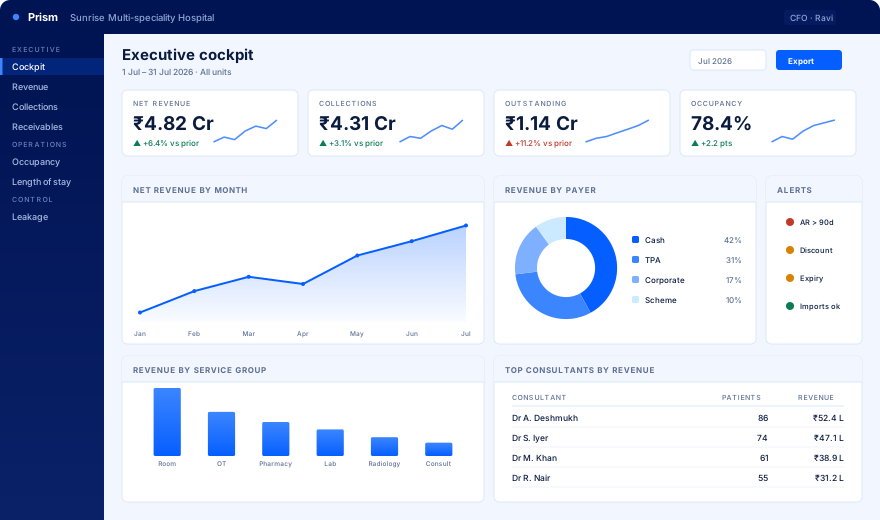
Whichever route your data takes, this is what comes out. Illustrative data shown.
Prism holds its own reporting database. Nothing analytical ever runs against the system your wards and billing counters depend on.
Data is copied on a schedule you set. Management can run whatever analysis it likes at month end without a clerk noticing a slow screen.
Occupancy, outstanding and stock positions are true only at a point in time. Prism captures them daily, so next year you can still answer what the position was last Tuesday.
The same doctor typed four ways splits every report about them. Prism groups the spellings and asks a human to approve the merge rather than silently deciding.
We link to your data, read the schema and run readiness checks. You see the first exception list from your own billing.
Revenue, collections, receivables, payer mix and the leakage console go live for the management team.
Occupancy, length of stay, OPD, lab and pharmacy. Spreadsheets fill the gaps your system never held.
Your team is trained on Ask and saved reports. From there, new questions do not need us.
Four weeks assumes reasonably clean data. The week-one readiness report tells you honestly whether that holds, rather than discovering it in week three.
One hospital, one month of your data, and the exception list from your own billing.